Counterparties
Create and manage the beneficiaries (individuals and businesses) that customers pay to.
Counterparties
A counterparty is a beneficiary — an individual or a business — that a customer (user) sends payments to. Counterparties are created and managed by the GMA partner admin on behalf of the customer.
Every payment flow begins with a counterparty. Before any funds can be sent, the counterparty must be created, enabled, and have at least one payment instrument attached to it.
Key concepts
- Individual vs. Business — Use the appropriate creation endpoint based on the counterparty type. The required fields differ between the two.
- Enable before paying — If a counterparty is disabled, it must be enabled before initiating a payment to it. Call
PUT .../enableto activate it. - Compliance review — If a counterparty is flagged or requires review, call
GET .../request-compliance-reviewto trigger the process. Payments cannot proceed until compliance is cleared. - One user, many counterparties — A single user can have multiple counterparties. Use
GET /counterparty/{userId}/counterpartiesto list them.
Status lifecycle
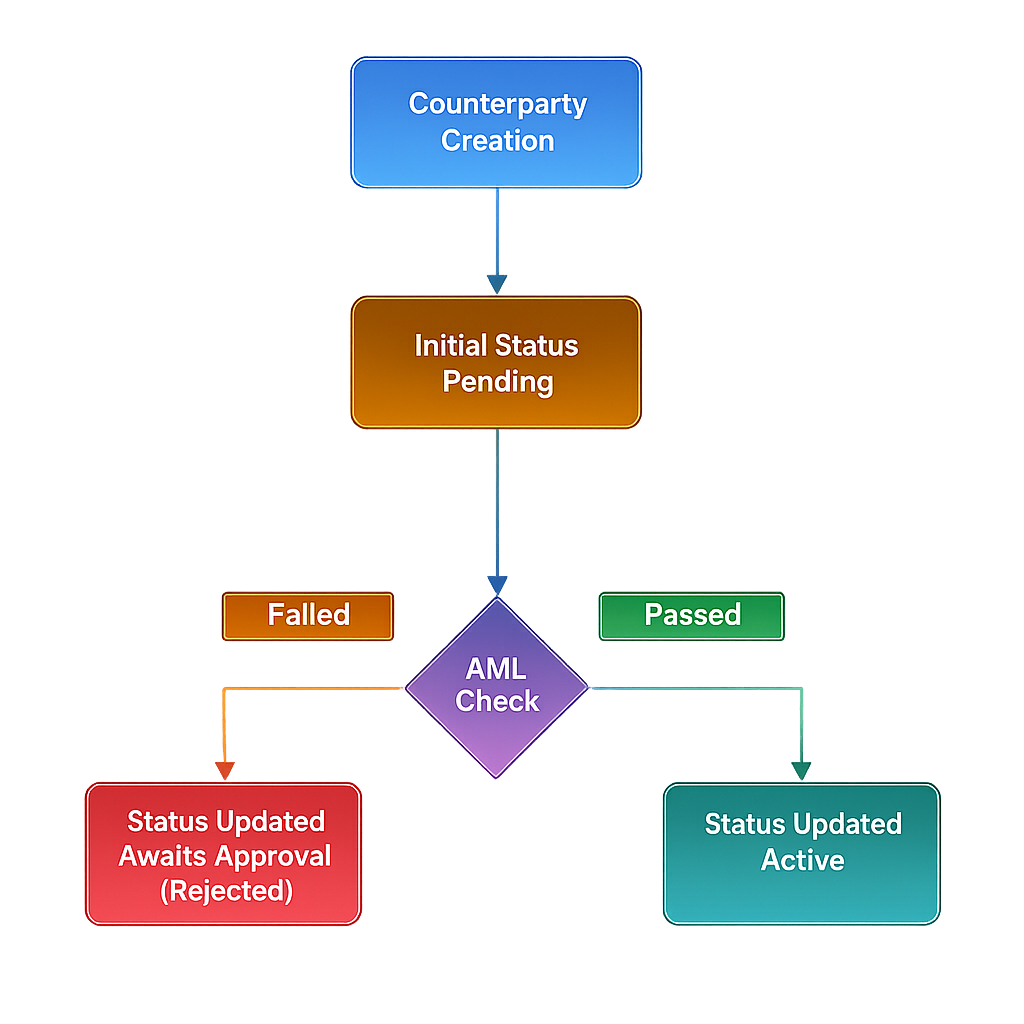
Common workflows
Add a new beneficiary for a user
POST /counterparty/{userId}/create— create an individual or business counterparty.PUT /counterparty/{userId}/counterparties/{counterpartyId}/enable— activate it.- Add a payment instrument (see the Counterparty Instruments guide).
Disable a counterparty temporarily
PUT /counterparty/{userId}/counterparties/{counterpartyId}/disable — disables without deleting. Re-enable at any time.